Nothing, until something's close.
MeetKeeper stays invisible. A few minutes before a meeting the notch grows a pill with the countdown and a Join button. Glance, click, you're in.


See what's next, join calls in one click, add events by typing a sentence. All from the MacBook notch.
Free for 14 days, then $9.99 once · macOS 14 or later · Apple silicon MacBook
Hover the notch, or just watch.
Six things you'll use every day. None of them need an app open.

MeetKeeper stays invisible. A few minutes before a meeting the notch grows a pill with the countdown and a Join button. Glance, click, you're in.
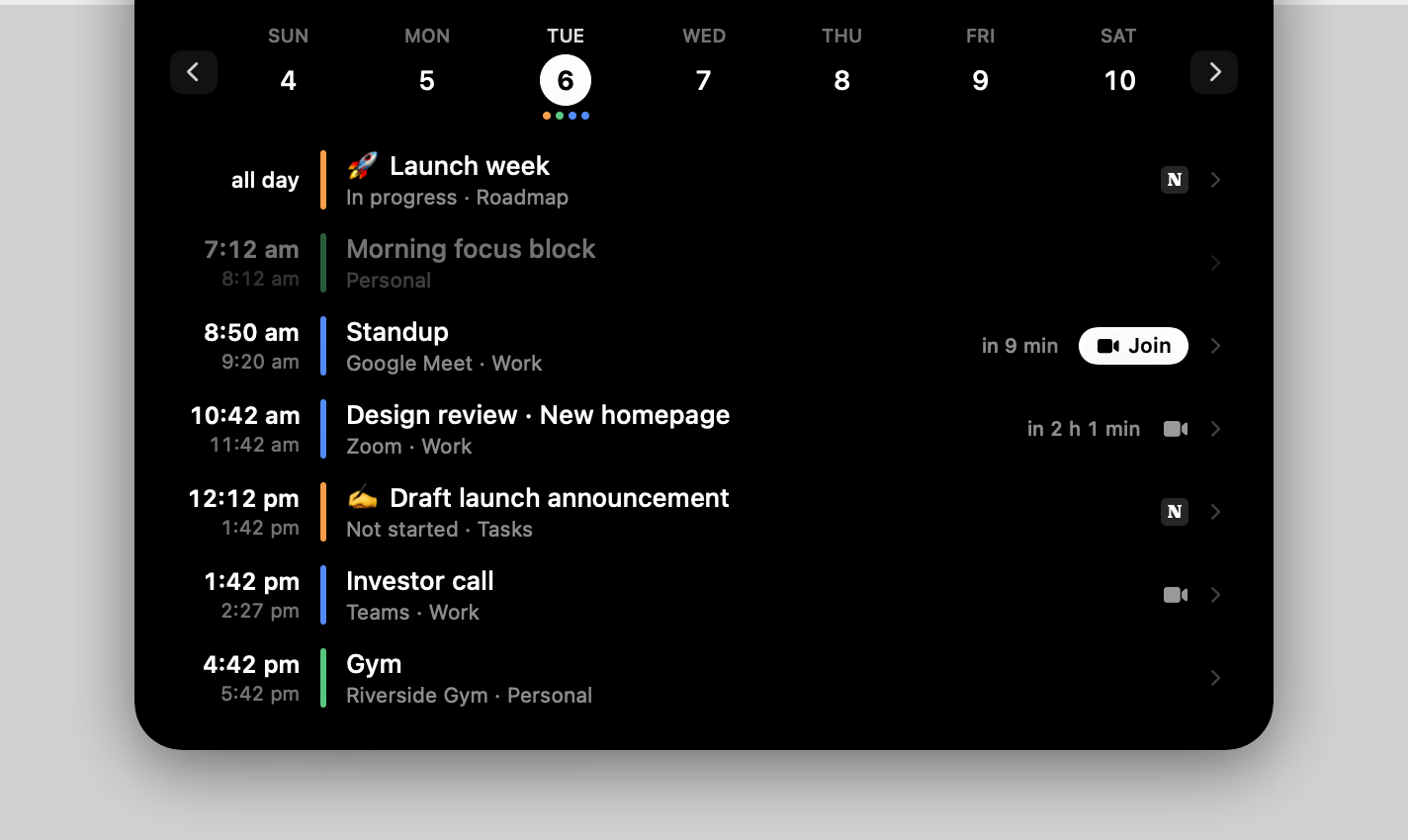
Every event with its calendar colour and a live countdown, a NOW badge while something's on, a week strip to look ahead. Click an event for attendees, notes and the meeting link.
Press ⌃⌥N from any app and type. MeetKeeper shows exactly what it will create, flags overlaps, and saves on Enter. It lands in your Google or Outlook calendar straight away.
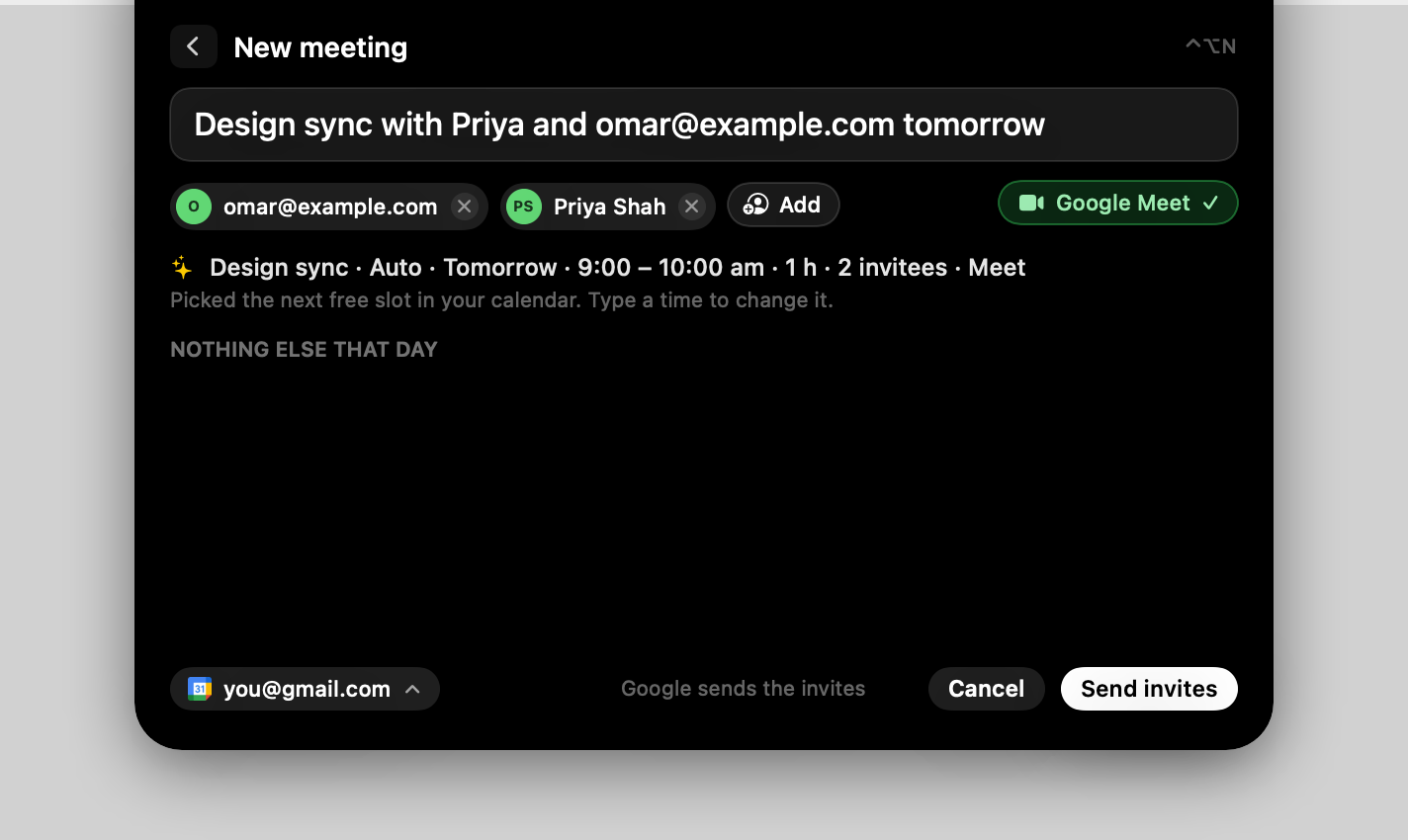
Names and emails become guest chips. Google sends the invitations and attaches a Google Meet link. Skip the time and MeetKeeper finds your next free slot.
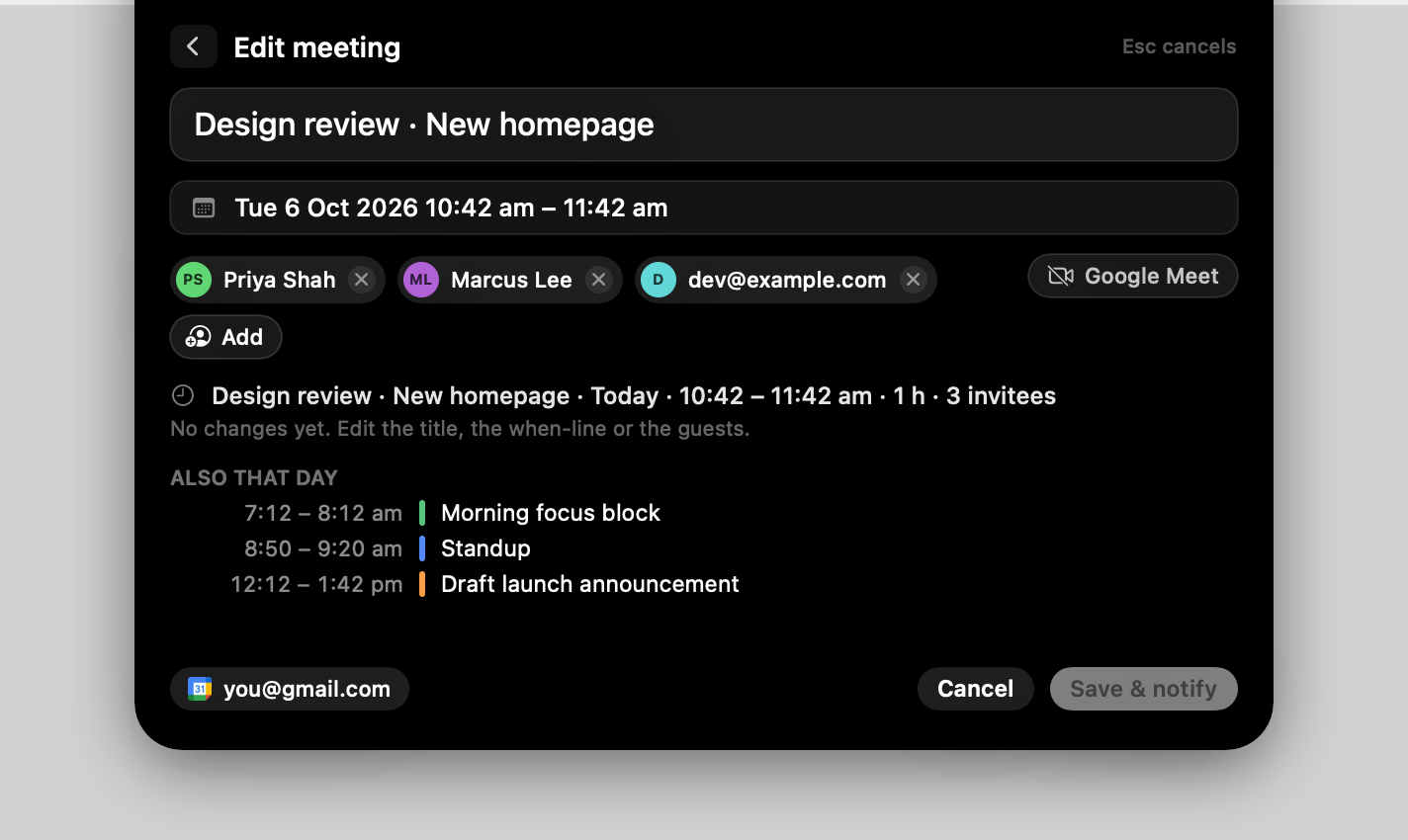
Open any event and press ✎. Type 4pm to move the time, fri to move the day, all day to clear it. Add or drop guests. Delete with one inline confirmation, and guests get a cancellation.
Two minutes before, the notch drops a banner with the event, its time and Join. One click and you're in. Set it anywhere from when it starts to ten minutes before.


 meet · zoom · teams
Google Calendar and Outlook in one click. Apple Calendar and iCloud are already on your Mac. Everything stays in sync.
 One click
 One click
 Built in
 Built in
we kept opening a calendar app forty times a day just to check when the next call was.
the notch is always there. always on screen, always in the corner of your eye.
so we put the calendar in it. the pill, the countdown, the join button, the whole day on hover.
a calendar shouldn't be an app you open. it should be a glance.
it's native, and all of it is yours to try free for two weeks. try it and tell me what you think.
anshuman, founderNative Swift, not a web app. Your calendars are read on your Mac through Apple's own framework, and nothing leaves it unless you connect Google, Outlook or Notion yourself.
Every feature from the first launch. When the trial ends, pay once and keep it: no subscription, no account.
after your 14-day free trial
no card for the trial · 14-day refunds
Checkout, tax and receipts by Polar, our merchant of record. Local tax is added at checkout where it applies.
The short version of everything people ask before they install.
Any Apple silicon MacBook with a notch (2021 or later) on macOS 14 Sonoma or newer. On a Mac without a notch, or an external display, it draws a small virtual notch at the top of the screen. There is no Windows version.
Google Calendar and Outlook (Microsoft 365, Outlook.com, Exchange Online) connect in one click from Settings. Apple Calendar and iCloud are already there through macOS. If you use Notion Calendar, connect the same Google or iCloud account and the notch shows exactly the same events.
See what's next, join Google Meet, Zoom or Teams in one click, and press ⌃⌥N from any app to type an event like Design sync with priya@example.com fri 3pm. Names become invitations with a Meet or Teams link attached, invitations you receive get a Yes, Maybe or No, and the pencil edits or deletes an event, one occurrence of a series at a time.
Nowhere. Calendars are read on your Mac, and Google or Microsoft are contacted directly only when you connect them. There is no MeetKeeper account and no MeetKeeper server holding your events; the app contacts meetkeeper.fun only to check for updates, or to deliver feedback when you choose to send it.
$9.99, once. Every copy starts with a 14-day free trial with every feature and no card. When the trial ends, buy a licence to keep using it: there is no subscription and no account, and your licence key arrives by email. Checkout is run by Polar, which adds sales tax, VAT or GST where your country charges it.
Yes. One licence runs on 2 Macs at the same time, like a laptop and a desktop. Moving to a new Mac? Remove the old one in MeetKeeper's settings, or email us and we'll free it up. MeetKeeper checks your licence every few days, so please keep your key to yourself: shared keys can be switched off.
Email us within 14 days of your purchase and you get a full refund, no questions asked. The refund policy has the details.
Thank you for being early. Version 1.3 adds licences, and your 14-day free trial starts when it installs, the same as everyone else's. After that, a $9.99 licence keeps it running on 2 Macs.
MeetKeeper isn't from the App Store yet, so your Mac double-checks it the first time: System Settings → Privacy & Security → Open Anyway, once. The install guide walks through it.
By themselves. MeetKeeper checks for a new version a few times a day, downloads it in the background, verifies its signature, then shows one line in the panel: Restart. Click it and the notch is back in a second; ignore it and it installs the next time the app quits.
⌃⌥N opens quick add from any app. Click the notch to pin the panel open, Esc closes it. ⌘N in the menu-bar menu starts a new event.
Try it free for 14 days. Your next meeting is already in the notch.